This feature allows modifying store name, store hours, and change the tax rate. These are set by default so if merchants want to change it they can quickly change it and will take effect on their store.
-
Click on the Menu icon from the home screen → Select ‘Configurations’ → Location
-
Enter the company details in the provided fields.
-
Click ‘Save’.
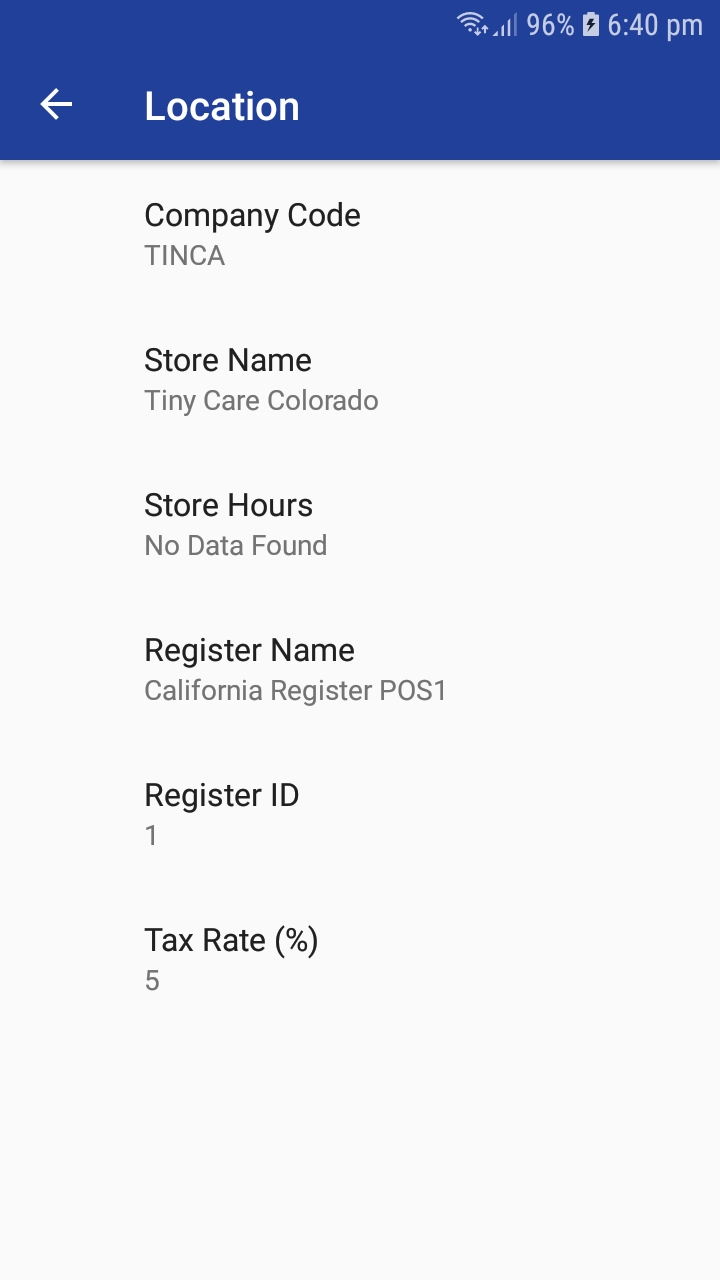
Company Code: View the company code.
Store Name: Modify the name of the Store.
Store Hours: Add or modify store hours.
Register Name: View the Register Name.
Register ID: View the Register Name.
Tax Rate: Modify the tax rate.
Articles in this section
- Zebra RFID Checkout Support in 6IXPOS
- JPMorgan Chase Payment Processor in 6ixPOS
- Tender Rounding in POS
- Phone Order Checkout in 6ixPOS
- FreedomPay in 6ixPOS
- ValorPay Integration on 6ixPOS
- CRM Capture in 6ixPOS
- Suspend & Resume Transaction
- Serialization in 6ixPOS
- Stripe Terminal Integration on 6ixPOS
Comments
Please sign in to leave a comment.