Overview
Go to CAS --> Management --> Inventory Classification --> Attributes --> Price Matrix
You have the ability to create a matrix of selected attributes to create a large number of new items using the price matrix This feature allows you to select multiple attributes, such as brand and style, and enter the cost and price. When the matrix is applied to the create item feature, all items that fall into that matrix can be made with the specified cost and selling price.
Name: Mandatory field to provide a name for the Price Matrix. This name is the way it is identified on the Master Item screen under Select Size Brick
Attribute Type: Select the attributes (at least one must be selected)that you want to be considered in the pricing matrix
Attribute Value: Select from your existing attributes the one that you want the pricing to be applied to
Cost: Enter the cost that you want to be applied to all items created using this matrix
Retail: Enter the sales price that you want to be applied to all items created using this matrix

Once the price matrix is created, it is available on the Master Item Screen under Size Bricks.
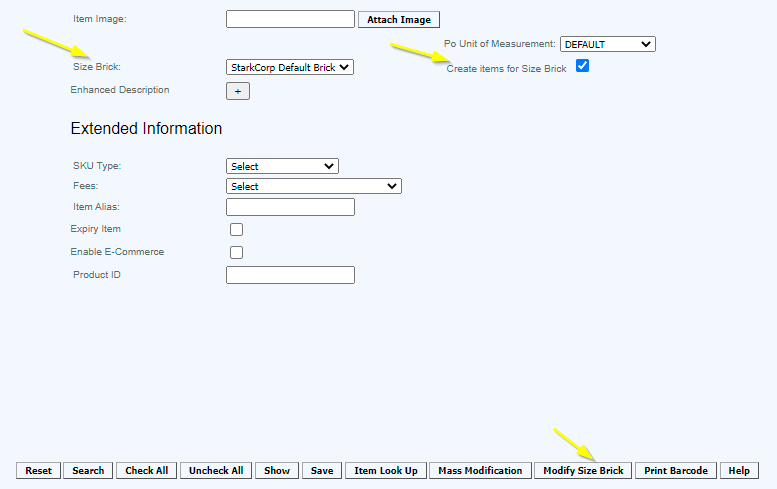
When you wish to create multiple related items using the price matrix you made, navigate to Size Brick and select a size brick from the drop-down option on the Master Item screen, check the box "Create items for Size Brick" and press Modify Size Brick button at the bottom of the page to continue with the matrix item creation process.
When Modify Size Brick is selected on the Master Item screen, the Attribute Matrix is displayed. Enter the attributes that you wanted to create in addition to sizes.
To add attributes, enter the attribute in the box, (enter "b" and it will show all Colors with a "b" in the color), highlight and press Add. Once added to the larger box, it is available to add to the attribute size brick.

To apply a price matrix to the items being created enable the Price Matrix and select the Price Matrix from the drop-down.
Press save to create all of the items that fit the criteria (as displayed on the Modify Size Brick screen).
Articles in this section
- Central Administration System
- Configuration
- Company Details
- Company Information
- Payroll Settings
- Merchant Email Configuration
- Invoice Setup
- QSR
- Payment Settings
Comments
Please sign in to leave a comment.