The system has the ability to merge attributes and classifications. This is useful once the domain has been in use for a while and changes have occurred within the business that required to be adjusted.
In order to merge Color with the another, access CAS --> Management --> Inventory --> Modify Inventory and select color and then select the color that you want the other to merge into (meaning the other color become the one you select) and the following screen will be displayed.
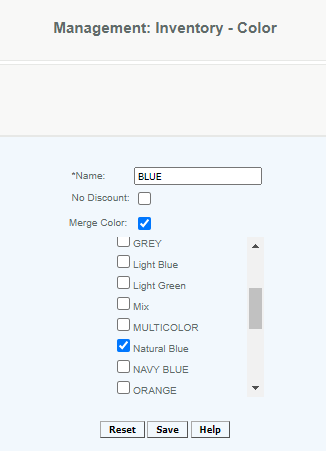
Select Merge Color and then select the Color you want to merge and Save.
Notes: All color names should be unique and we do not support merging colors with the same name. You will not be able to merge colors having the same name even when one of the colors is already inactive.
Articles in this section
- Central Administration System
- Configuration
- Company Details
- Company Information
- Payroll Settings
- Merchant Email Configuration
- Invoice Setup
- QSR
- Payment Settings
Comments
Please sign in to leave a comment.