Adjust or set selling prices for a batch of items. For example, you can apply a fixed amount/percentage markup to the prices of multiple items.
Management --> Inventory Classification --> Mass Modify Price
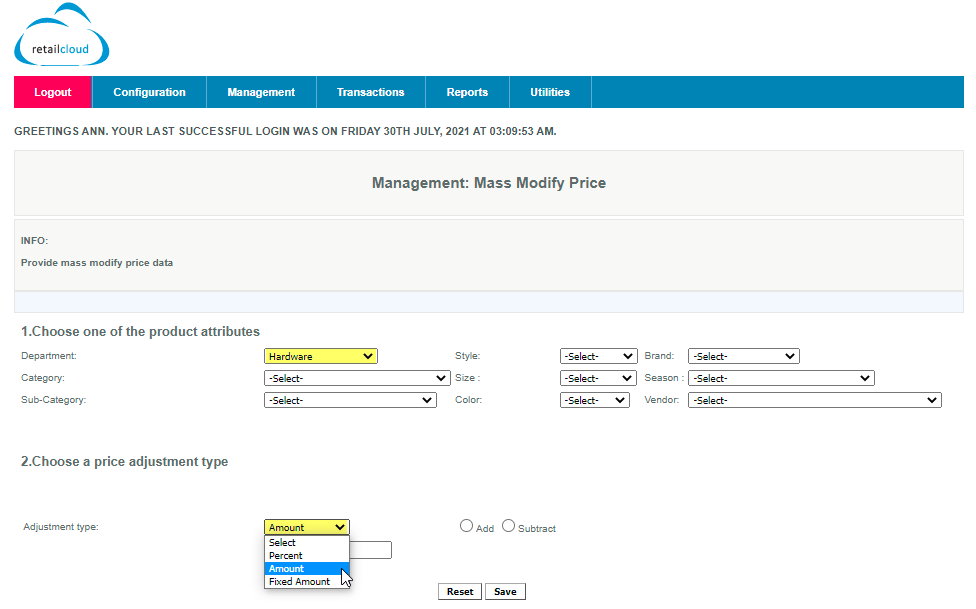
To create a bulk pricing change
- Login to https://realtimetotals.com
- Navigate to Management --> Inventory Classification --> Mass Modify Price
- Choose one of the product classifications/attributes from the drop-down. (Department/Category/SubCategory/Brand etc.
- Select the price adjustment Type and click so that the corresponding price adjustment options are displayed.
- Enter the Percentage, Amount, or Fixed Amount.
- Use the Add /Subtract to make adjustments to the current values if applicable.
- Click Save.
Articles in this section
- Central Administration System
- Configuration
- Company Details
- Company Information
- Payroll Settings
- Merchant Email Configuration
- Invoice Setup
- QSR
- Payment Settings
Comments
Please sign in to leave a comment.