Go to Management --> Inventory Classification --> Master Item
Navigate to Extended Description
This field is for entering in additional information to an item and also can be printed on bar code labels to enhance the description.
Details
From the Master Item page, click on the Search Button at the bottom of the page to display all the item lists.
Find and select the item you want to add image and hit Show.
Navigate to Extended Description
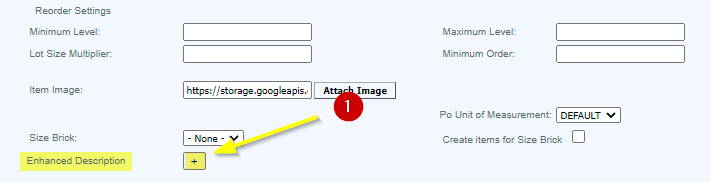
Click on the '+' button and enter the description in the field provided. (Maximum characters: 500) and hit Save.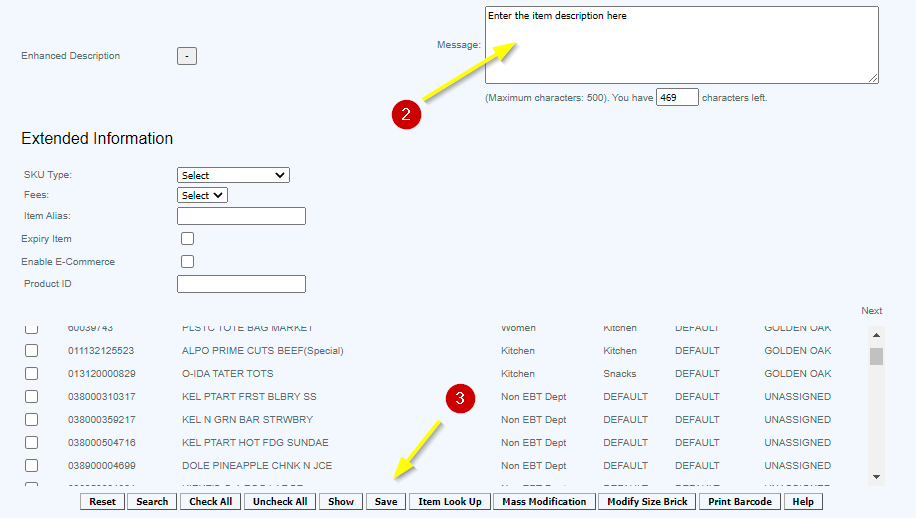
Articles in this section
- Central Administration System
- Configuration
- Company Details
- Company Information
- Payroll Settings
- Merchant Email Configuration
- Invoice Setup
- QSR
- Payment Settings
Comments
Please sign in to leave a comment.