How to display multiple items when you ring up a UPC?
Problem:
You have items that you want to be displayed with the different size options and the cashier to be able to select the size that is being sold.
Example: You sell Corona Beer as a Case, 6 pack, single bottle and you have created these sizes based on breaking up of cases of Corona that you purchased from Costco
Solution:
Create the 3 items. Each with a unique item ID and the selling price for the quantities. Use the same UPC for all three items.
When the cashier rings up the UPC, all three items will display with the price so they can select the item being sold. If you hover over the image, the item description is displayed
How to Create Measurement Units (Cases/Boxes/Bottle etc)
Go to CAS --> Management --> Inventory Classification --> Units
Measurement units are added at the item level so that when the item is purchased from the vendor, units are correctly reflected as to how many are purchased, and when the item is sold at the store, units are also reflected correctly.
Details
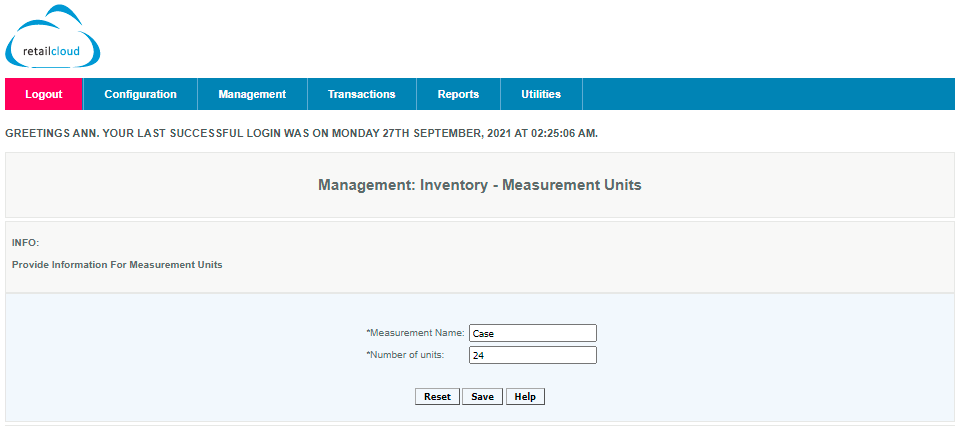
Enter the Measurement Name (the name of the unit of measurement)
Each Measurement Unit must have its own unique Unit Description. This will show up in all reports and filters so you should name them carefully. If you try to create a measurement unit with an existing name a popup will be displayed asking you to confirm this activity.
Give the Number for the units description to which it corresponds. Example, Box = 10, Dozen=12 etc.
Click on Save to create the Measurement Unit.
Additional Clarification:
You can create multiple items, all with the same UPC. When you scan the UPC, a pop up is displayed with all of the items which were created using the same UPC.
You can select as many of the items as you need to add to the sales cart, when you are done adding items press the "Green" check mark and you return to the sales cart.
If your items have images attached it will display the image. If you hover over the item with your mouse, the item description will display on the screen.

Search Item with Multiple UPC

Articles in this section
- Getting Started
- Setup
- Installation & Download
- Uninstallation
- Training Mode
- Signing In
- Clock In/Clock Out
- Configure
- Setup
- Terminate
Comments
Please sign in to leave a comment.