The POS Configuration Import feature streamlines updating predefined configurations for POS and Account levels via file import. By default ‘System Admin’ will have the permission to perform POS Configuration Imports.
Go to Utilities → Import→ Other → click on POS Configuration Import
You'll need access to a spreadsheet program that supports CSV files such as Excel or Google Sheets. Any other file type will not import.
You can download the sample template by clicking on the Download Sample link.
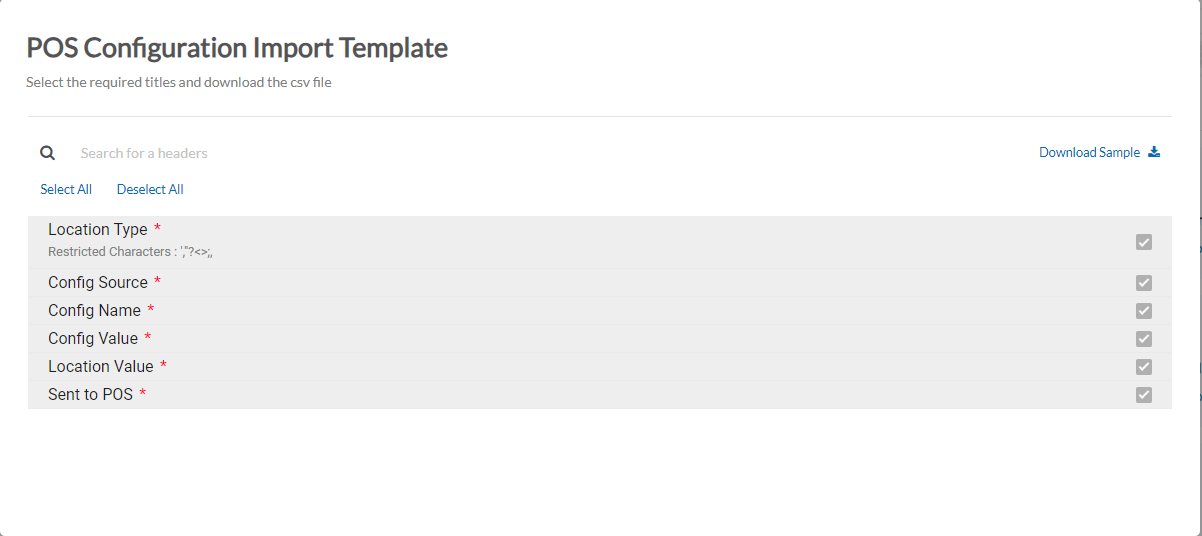 Importing
- Upload Your File: Attach the Item file by simply Drag & Drop or uploading your CSV file directly from your computer by browsing for it.
- Click Continue when done.
-
Column Mapping: Once the file is loaded the column headers from the file will be displayed below the heading ColumnName. In the case of the column header from the file exactly matching the Console field name this will be automatically mapped and this is displayed in the Map to Field.
-
You can map and make sure all of the column field data you're importing has been matched to its equivalent setting on Console.
-
Enter the email address to which you will receive the status of your import.
-
Click Continue.
-
The Import will be Initiated → Click Finish.
-
You will be taken back to the Import page, where at the bottom you can see a section 'Recent Imports' which will show the details and current status of the imported file.
-
Click on the Status (highlighted in blue color) to view the Status Report- This will list both Imported Records as well as Failed Records with a reason for the failure. You also have the option to Download the Failed Records by clicking on the Download button. You can correct the remaining failed record and precede to reimport them.
-
Once done, you can see the Status as COMPLETED
Articles in this section
- Item Import Field Descriptions
- Overview
- Merchant Onboarding
- Navigation Bar
- Reports
- Items
- Settings
- Dashboard Overview
- Company
- Register
Comments
Please sign in to leave a comment.