The Payment Processors section in Setings allows merchants to configure and manage payment terminals directly within the Console. Users can:
Select a payment processor
Add terminal configurations
Assign configurations to specific registers
This self-service setup reduces onboarding time, minimizes manual errors, and provides better control over register-level payment configurations.
How to Access Payment Processor Configuration
Navigate to Settings → Payment Processor
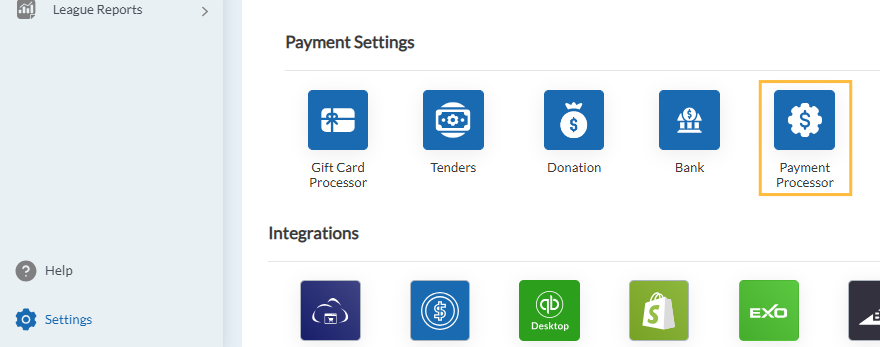
From here, user can see a list of available processors such as FreedomPay, Verifone, Stripe
Click on a processor to view or add configurations.
How It Works?
Step 1: Select a Processor
Choose the Processor you want to configure (For eg, Stripe).
Step 2: View Existing Configurations
User can see any existing configurations already created for that processor.
Step 3: Add a New Configuration
User can add and connect a new register mapping configurations from here. User can enter the processor-specific credentials and map the registers for the processors from here.
Step 4: Save
Once saved, the terminal configuration will be linked to the selected registers.
Supported Payment Processors
Allows to setup and manage custom payment options for your system from here.
FreedomPay
This allows you to connect and manage your FreedomPay Payment Devices. You can add a new configuration with the following fields:
Secret Key
- Payment URL
- To map the registers,
- Store Name
- Register
- External Store ID
- Terminal ID
- Device Management URL
- Device Management Activation Key
- Device Management Machine Name
- User can map multiple stores and multiple registers under stores by clicking on + button.
- To delete an entry, user can click on X.
PAX
Allows the users to connect and manage your PAX payment devices. Configuration fields includes:
- To map the registers,
- Store Name
- Register
- Connection Type (USB, TCP, Integrated)
- Port (only for connection type = TCP)
- IP Address (only for connection type = TCP)
- Direct Integration (None (default value), Shift4)
- If Shift4 is selected, more details are needed to configure such as:
- API URL
- Auth Token
- Company Name
- Retry Interval
- Retry Count
- Users can map multiple stores and registers by clicking on + button.
- To delete an entry, users can click on X.
Shift4
This allows you to connect and manage the Shift4 payment devices. Configuration fields includes:
- To map the registers,
- Store Name
- Register
- Secret Key
- Users can map multiple stores and registers by clicking on + button.
To delete an entry, users can click on X.
Verifone
Allows the users to connect and manage your Verifone payment devices. For more information, Click Here
Configuration fields includes:
- To map the registers,
- Store Name
- Register
- IP Address
- Users can map multiple stores and registers by clicking on + button.
- To delete an entry, user can click on X.
Stripe
Allows the users to connect and manage your Stripe payment devices. For more information on Stripe, Click Here.
Configuration fields includes:
- Account Number
- Enter Maximum Limit
- To map the registers,
- Store Name
- Stripe Location ID
- Register
- Connection Type (Internet, Bluetooth, USB, Tap To Pay)
- Serial Number
- Enter Maximum Limit
- Users can map multiple stores and registers by clicking on + button.
- To delete an entry, user can click on X.
This configuration page will give users full control over configuring payment terminals and assigning them to registers directly from the Console to improve accuracy and reduce dependency on manual setup.
JPMorganChase
The JPMorgan Chase Payment Processor integration enables retailcloud POS to securely process in-store card payments through supported JPMorgan Chase payment terminals. This integration supports the complete payment lifecycle, allowing merchants to accept and manage credit card, debit card, and gift card transactions directly from the POS.
With this integration, merchants can process sales, voids, full and partial refunds, unlinked refunds, gift card payments, batch settlements, and manual card entry transactions. The integration also supports offline Store-and-Forward (SAF) processing, allowing transactions to be captured when network connectivity is unavailable and automatically submitted once connectivity is restored.
Allows the users to connect and manage your JPMorganChase payment devices. Configuration fields includes:
- To map the registers,
- Store Name
- Register
- Terminal ID
- IP Address
- Port
- Users can map multiple stores and registers by clicking on + button.
- To delete an entry, users can click on X.
Articles in this section
- Item Import Field Descriptions
- Overview
- Merchant Onboarding
- Navigation Bar
- Reports
- Items
- Settings
- Dashboard Overview
- Company
- Register
Comments
Please sign in to leave a comment.