Calling Server
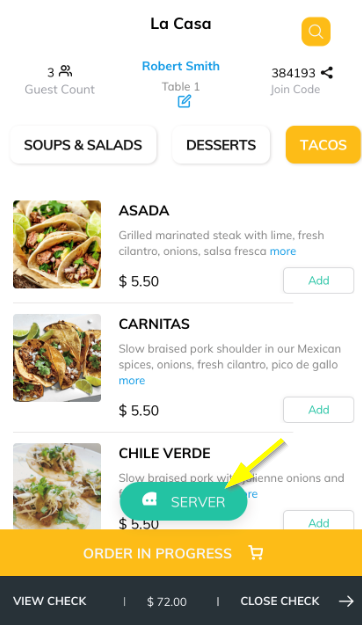
Meanwhile, if you want to call the server to the table, for tasks like cleaning the table or bringing water the guest can click on the SERVER button at the bottom of the screen.
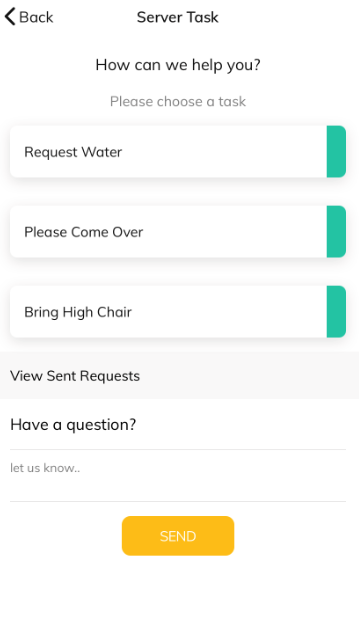
You can configure some pre-defined Tasks buttons to be displayed on the server screen along with the comment text field.
View Sent Requests
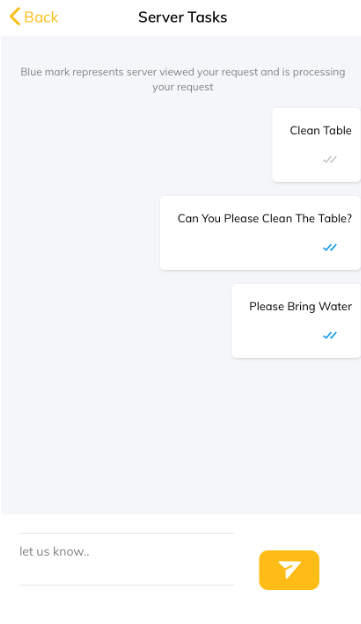
To view all the send requests to the server, click on View Send Request'. The blue double tick mark represents the server has viewed your request and is processing your request.
Articles in this section
- Overview
- Tikt Merchant Portal
- Tikt Configurations
- Open Auths
- How to Add Transaction Fee?
- Pick-Up Orders
- Menu Creation & Setup
- How Tikt Works?
- Scan the QR Code on the Table
- Guest Count & Contact Tracing
Comments
Please sign in to leave a comment.